AI-Assisted Help Desk and Department Support System
Final Systems Analysis and Design Project
Ahmed Uzair
Ayush Dhungel
Hiren Merubhai Parmar
Rohit Alavala
Ottawa University
IT-7000: Systems Analytics & Enterprise Management
Professor Joel Short
August 22, 2026
AI-Assisted Help Desk and Department Support System
This final project compiles and improves the work completed throughout the course for the proposed AI-Assisted Help Desk and Department Support System. The project began with a common organizational problem: employees often do not know where to send an internal question, while support staff spend time reviewing, redirecting, and repeatedly answering requests that may already be addressed in company resources. Across the project, the team moved from defining the business problem and requirements to designing the system, evaluating alternatives, building an input-form prototype, presenting the recommendation, and planning a controlled transition. The final proposal uses AI to support employees and departments while preserving human responsibility for judgment, escalation, and service quality.
Project Foundation and Business Need
The project began by defining the business problem before selecting technology. Dennis et al. (2021) explain that systems analysis and design connects business needs with information systems capable of supporting those needs. In the current process, an employee may send an email, use a shared inbox, contact the wrong department, or search multiple sources for an answer. The same question may be answered repeatedly even when the organization already has an approved policy, training guide, SharePoint page, or knowledge-base article.
Microsoft (n.d.) describes SharePoint as a platform that helps organizations store, organize, share, and access information. Connecting approved organizational resources to the proposed system would make existing knowledge easier to use. An employee would submit one request through a central portal. The system would analyze the description, identify the likely category, search the connected knowledge base, and either suggest an approved resource or route the request to the responsible department.
Stakeholders, Scope, and Expected Business Value
The principal stakeholders are employees who submit requests; IT, human resources, accounting, operations, and other departmental staff who resolve them; managers who monitor workload and outcomes; system administrators who maintain the platform; and organizational leadership responsible for efficiency, risk, and investment decisions. Each group has a different interest in the project, so requirements, permissions, testing, and training must reflect those roles.
The initial scope includes centralized request intake, AI-based classification, knowledge search, suggested answers, automatic ticket routing, role-based access, basic reporting, and user-acceptance testing. It excludes staff replacement, full automation of every departmental process, and complex integration with every enterprise system during the first release. This boundary keeps the pilot realistic and allows the organization to validate business value before expanding.
Expected business value includes faster routing, fewer repeated questions, better use of existing knowledge, more consistent accountability, and clearer management information. The system is intended to assist support staff, not remove them; unresolved, sensitive, or high-risk issues remain subject to human review and escalation.
System Requirements
The business problem was translated into six functional requirements. Each requirement is traceable to a specific weakness in the current process and is assigned a priority reflecting its importance to initial operation.
Table 1
Functional Requirements and Priorities
ID | Requirement | Priority | System Shall |
|---|---|---|---|
FR-01 | Centralized request portal | High | Provide one web-based entry point for all internal support requests. |
FR-02 | AI-based request classification | High | Analyze the request description and recommend the responsible department. |
FR-03 | Knowledge-base search | High | Search approved articles, policies, and guides before creating a ticket. |
FR-04 | Automatic ticket routing | Medium | Forward unresolved requests to the appropriate departmental queue. |
FR-05 | Management reporting | Medium | Report volume, response time, resolution rate, and common request types. |
FR-06 | Role-based access control | High | Restrict request and reporting access according to assigned responsibilities. |
Functional capability alone is not sufficient. The system must also meet measurable quality requirements so that it is fast, dependable, usable, secure, and maintainable during daily work.
Table 2
Nonfunctional Requirements
Quality Attribute | Measurable Requirement |
|---|---|
Performance | Classify and route requests within five seconds under normal load. |
Availability | Maintain at least 99.5% uptime during business hours. |
Scalability | Support growth in users, departments, and ticket volume without redesigning the architecture. |
Usability | Allow a first-time employee to submit and track a request without specialized training. |
Maintainability | Allow authorized administrators to update knowledge content and routing rules without source-code changes. |
Assumptions and Constraints
The design assumes the organization has approved knowledge content, active organizational accounts, employee browser access, department owners who can maintain routing rules, and historical support data that can support testing. The solution must integrate with existing authentication, protect employee data, follow applicable privacy requirements, and operate within existing cloud infrastructure without requiring new hardware for the pilot.
System Design Specification
The design translates the requirements into a three-tier architecture containing a presentation layer, an application logic layer, and a data layer. Separating these responsibilities makes the solution easier to secure, test, maintain, and expand.
Presentation Layer
The presentation layer contains the employee request portal, knowledge suggestions, ticket-status views, and the manager reporting dashboard. It is accessible through a standard web browser so employees do not need to install separate client software.
Application Logic Layer
The application layer contains the AI classification engine, knowledge-search module, ticket-routing engine, workflow and notification logic, and reporting module. It receives requests from the portal, applies business rules, and communicates with the data layer to retrieve or store information.
Data Layer
The data layer stores employee profiles, ticket records, request categories, routing rules, resolution history, and audit logs. Structured records can be stored in a relational database, while approved knowledge content may remain in SharePoint or another managed repository that supports search and controlled updates.
Data Flow, Integration, and Security
When an employee submits a request, the system authenticates the user, analyzes the request text, assigns a category, and searches approved knowledge content. If an article solves the issue, the employee may close the interaction without creating a ticket. If the issue remains unresolved, the routing engine creates a ticket, forwards it to the responsible queue, records status changes, and makes summarized results available for reporting.
Security is included throughout the design. The system uses the organization's existing single sign-on, role-based access control, TLS 1.2 or higher for transmitted data, audit logging, and configurable inactivity timeouts. Employees may view only their own requests, support staff may view tickets assigned to their departments, managers receive appropriate reporting access, and administrators maintain configuration and security settings.
Figure 1
Context Diagram for the AI-Assisted Help Desk and Department Support System
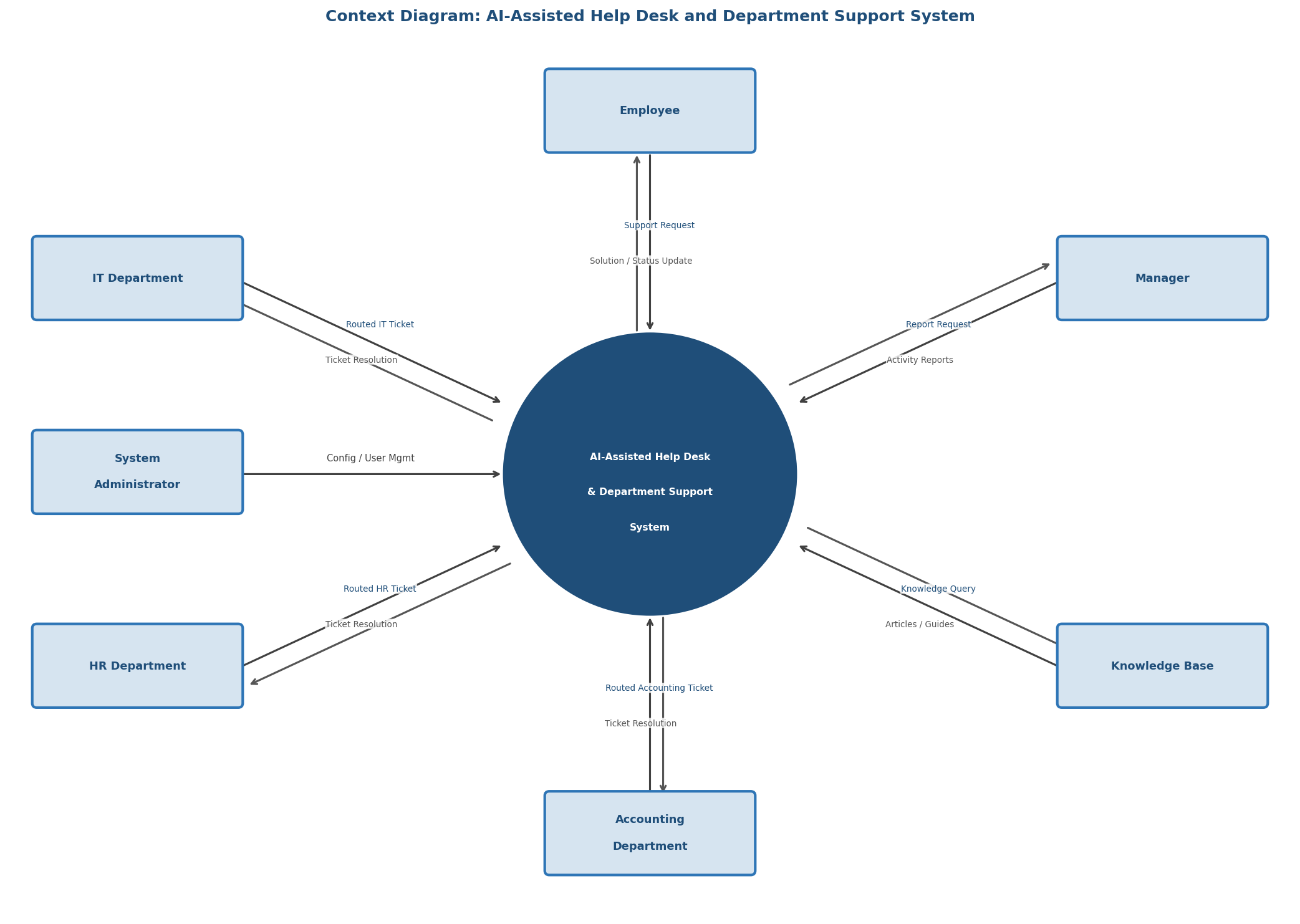
Note. Created by the project team. The central process exchanges requests, knowledge, tickets, resolutions, reports, configuration, and status information with the external entities shown.
Alternative Analysis and Solution Selection
Three implementation approaches were compared rather than assuming that one technology was automatically the best choice: a custom-built system, a packaged help-desk software-as-a-service solution, and a cloud AI platform. The evaluation considered functional coverage, AI accuracy, integration, cost, deployment time, scalability, security, vendor support, and training requirements.
Each criterion was weighted according to business importance and each alternative was rated from 1 (poor) to 10 (excellent). The weighted decision matrix gave the cloud AI platform the highest total score at 8.05, followed by the packaged SaaS option at 7.90 and the custom-built option at 7.10.
Table 3
Complete Weighted Alternative Decision Matrix
Evaluation Criterion | Wt. | Custom Build | SaaS | Cloud AI | Rationale |
|---|---|---|---|---|---|
Functional requirements coverage | 20% | 9 / 1.80 | 8 / 1.60 | 7 / 1.40 | Meets the six functional requirements. |
AI classification accuracy | 15% | 9 / 1.35 | 7 / 1.05 | 9 / 1.35 | Ability to classify tickets accurately. |
Integration with existing systems | 15% | 6 / 0.90 | 8 / 1.20 | 9 / 1.35 | Compatibility with SSO, SharePoint, and email. |
Implementation cost | 10% | 4 / 0.40 | 8 / 0.80 | 7 / 0.70 | Acquisition, setup, and licensing cost. |
Time to deployment | 10% | 4 / 0.40 | 9 / 0.90 | 8 / 0.80 | Time until production readiness. |
Scalability | 10% | 9 / 0.90 | 7 / 0.70 | 9 / 0.90 | Ability to grow by volume and department. |
Security and role-based access | 10% | 9 / 0.90 | 8 / 0.80 | 8 / 0.80 | Security, privacy, and FR-06 support. |
Vendor support and maintenance | 5% | 3 / 0.15 | 9 / 0.45 | 8 / 0.40 | Support availability and service commitments. |
User training requirements | 5% | 6 / 0.30 | 8 / 0.40 | 7 / 0.35 | Ease of adoption for nontechnical employees. |
Total | 100% | 59 / 7.10 | 72 / 7.90 | 72 / 8.05 | Highest weighted score is recommended. |
Note. Pts = points assigned on a 1-10 scale; Wtd = weighted points. Weights sum to 100%. Cloud AI is the recommended alternative because its weighted score of 8.05 is the highest.
The cloud approach provides strong AI, integration, scalability, and security without requiring the organization to build and maintain the entire platform from the beginning. Microsoft Copilot Studio is one example of a cloud platform designed to create and manage AI agents and connect them with organizational data and workflows (Microsoft, 2026). A final purchase decision would still require detailed cost, privacy, security, and integration validation.
Input Form Design and Prototype
The prototype focused on the employee's first interaction with the system. A Wufoo request form was created to test the information required before AI classification, knowledge search, and routing. The form follows a logical sequence and uses short labels, required-field indicators, and familiar controls. Wufoo supports standard form creation and public link sharing, making it suitable for an early course prototype (SurveyMonkey, n.d.-a, n.d.-b).
Table 4
Prototype Information Groups and Business Purpose
Information Group | Fields Included | Reason for Inclusion |
|---|---|---|
Requester | Full name and email address | Identifies the employee and supports follow-up. |
Classification | Department and support category | Provides structured information before the AI reads the description. |
Request details | Priority, subject, and detailed description | Explains the issue and provides enough context for resolution. |
Self-service | Knowledge base or SharePoint checked | Shows whether the employee already attempted available resources. |
Follow-up | Preferred contact method | Allows the employee to choose email, phone, or Teams/chat. |
Figure 2
Completed Wufoo Input-Form Prototype
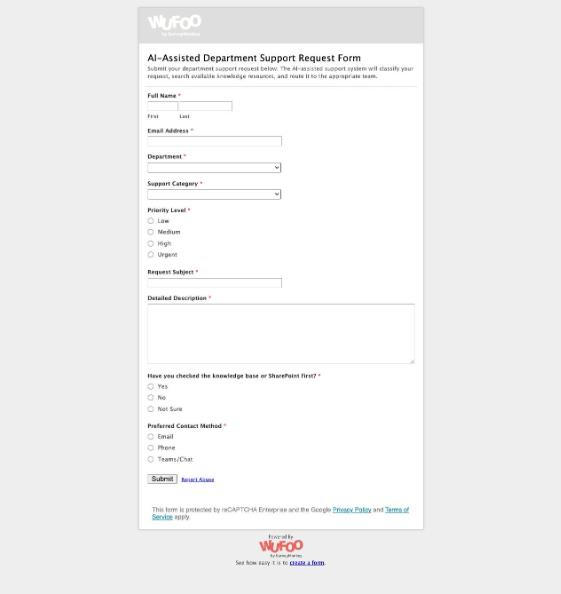
Note. Created by the project team. The prototype contains requester, classification, priority, request-detail, self-service, and contact-preference fields. The desired screenshot or document-upload field was unavailable on the free Wufoo account and would be required in production.
Public prototype: AI-Assisted Department Support Request Form
The prototype confirmed that input design directly affects downstream quality. Incomplete or confusing intake information would reduce classification and routing accuracy, while a clear form supports employee usability, resolution speed, and reporting consistency.
Executive Presentation and Recommendation
The culminating presentation and executive pitch translated the technical project into a business decision. The presentation explained the fragmented current process, the future-state workflow, the six functional requirements, the three-tier architecture, the context diagram, the alternative analysis, and the Wufoo prototype. It then requested approval for a controlled cloud AI pilot rather than an immediate organization-wide implementation.
The executive recommendation was to begin with selected departments, connect approved knowledge, configure routing and escalation, preserve human support, and measure performance before expansion. This presentation step ensured that the proposed system could be understood not only by technical staff but also by managers and organizational decision makers.
How the Project Improves the Current Business System
The proposed system improves the current business process in several practical ways. First, employees no longer need to understand the organization's internal structure before asking for help. They submit one request through a central portal, and the system determines where it should go. This reduces misrouted requests and the time employees spend forwarding emails or searching for the correct contact.
Second, the system makes better use of information the organization already has. Before creating a support ticket, it searches approved knowledge resources and presents a possible answer. Simple questions may be resolved immediately, while support employees can spend more time on problems that require their attention. This approach does not replace the support team; it gives the team a more effective first line of support.
Third, the system gives managers better visibility into the support process. Informal emails are difficult to measure, but a centralized system can show request volume, first-response time, resolution time, common categories, recurring issues, and self-service outcomes. Managers can use that information to identify training needs, outdated policies, documentation gaps, or departments receiving unusually high demand.
Finally, the project improves consistency, security, and accountability. Standard routing rules reduce dependence on individual memory, role-based permissions limit access to sensitive requests, and audit records show important activity. Over time, these features make the support process more dependable even when staffing or organizational responsibilities change.
Transition to the Proposed System
The transition must be managed as both a technology change and a people change. Employees need to understand why the process is changing, how the portal works, and what to do when an automated recommendation is incorrect. Dennis et al. (2021) emphasize that conversion, training, contingency planning, support, and postimplementation activities are all part of moving successfully from an existing system to a new one. A phased transition is therefore more appropriate than a sudden organization-wide cutover.
Table 5
Transition Phases and Acceptance Evidence
Phase | Primary Activities | Exit or Acceptance Evidence |
|---|---|---|
1. Preparation and data readiness | Confirm requirements, owners, roles, routing rules, baseline measures, and approved knowledge. | Approved scope, clean content, owners assigned, baseline documented. |
2. Configuration and integration | Configure SSO, knowledge sources, queues, permissions, notifications, attachments, and reports. | End-to-end integration and security tests pass. |
3. Pilot conversion | Introduce the system to a limited department group while retaining the current process as backup. | Routing, classification, escalation, and availability meet pilot thresholds. |
4. Training and change management | Train employees, support staff, managers, and administrators; communicate the reason for change. | Users can complete role-specific tasks and know the support path. |
5. Organization-wide rollout | Expand department by department and apply lessons from each rollout wave. | Each wave passes readiness review; contingency process remains available. |
6. Postimplementation improvement | Monitor performance, maintain knowledge, review access, resolve defects, and prioritize enhancements. | Postimplementation review compares outcomes with the approved baseline. |
Phase 1: Preparation and Data Readiness
Before launch, the project team should confirm the final requirements, departmental routing rules, security roles, knowledge owners, success measures, and support responsibilities. Existing policies, frequently asked questions, troubleshooting guides, and other approved resources should be reviewed. Outdated or duplicate information must be corrected because poor source material would reduce the quality of AI-supported answers.
Phase 2: Configuration and Integration
The selected platform should be configured with the organization's sign-on process, knowledge sources, routing rules, department queues, reporting requirements, and security permissions. The prototype form should be converted into a production-ready portal with secure attachments and validation. Integration testing must confirm that requests, knowledge searches, routing, notifications, audit records, and reporting operate together as expected.
Phase 3: Pilot Conversion
A pilot conversion is the safest starting strategy. The system should first be introduced to one department or a limited group of users while the existing support method remains available as a backup. The project team should compare AI classifications with actual routing decisions, review unanswered questions, monitor user feedback, and correct problems before expansion.
Phase 4: Training and Change Management
Training should be short and specific to each role. Employees need to know how to submit a request, evaluate a suggested article, track a ticket, and avoid unnecessary sensitive information. Support staff require training on queues, reassignment, escalation, and knowledge updates. Managers need reporting instruction, while administrators need deeper training on permissions, integrations, routing rules, and maintenance.
Communication is equally important. Employees should know what problem the project is solving, what will change, what will remain available, and where they can obtain help. Early feedback should be collected and used to refine the workflow. Adoption is more likely when users see that the system saves time and provides a clear path for correcting mistakes.
Phase 5: Organization-Wide Rollout
After the pilot satisfies the agreed acceptance criteria, the system can be expanded department by department. A phased rollout allows lessons from each group to improve the next wave. A contingency plan must remain active so employees can reach support staff if the portal, AI service, or integration is temporarily unavailable.
Phase 6: Postimplementation Support and Continuous Improvement
Implementation does not end on launch day. The organization must maintain a clear support channel, track defects, update knowledge content, review access permissions, and monitor AI classification quality. A postimplementation review should compare actual results with the project's approved baseline and goals to determine whether the system is reducing delays and improving the employee support experience.
Ongoing Development Approach
An Agile approach is appropriate after initial implementation because employee needs, knowledge content, and AI capabilities will continue to change. The team can maintain a prioritized improvement backlog and release smaller, tested changes over time. Regular feedback from employees and support departments can guide those priorities, reflecting Agile's emphasis on collaboration, useful working solutions, responsiveness to change, and continuous improvement (Dennis et al., 2021).
Implementation Risks and Success Measures
The principal risks are inaccurate classification, outdated knowledge, user resistance, incorrect permissions, integration failure, overreliance on automated responses, and inadequate contingency support. These risks can be reduced through human review, pilot testing, clear escalation paths, permission testing, content ownership, audit logging, and ongoing monitoring. Employees should also be able to indicate when an AI suggestion did not solve the problem so the workflow improves without trapping users in automation.
Success measures must relate directly to the original business problem. The pilot should measure routing accuracy, misrouted-ticket rate, average first-response time, self-service resolution rate, total resolution time, user satisfaction, system availability, repeated request categories, and security incidents. The organization should establish current-state baselines before implementation and compare the same measures after the pilot and each rollout wave. Final targets should be approved only after the baseline is measured so the project does not claim unsupported precision.
Conclusion
This project demonstrates how a systems idea develops from a business problem into a complete, testable proposal. The team progressed through project definition, requirements, architecture, data flow, security, alternative evaluation, prototype development, executive communication, implementation planning, and continuous improvement. Each stage strengthened the decisions made in the preceding stage and showed why systems analysis involves the coordinated design of people, processes, data, and technology.
The strongest part of the proposal is not AI by itself. The value comes from redesigning the support process around one intake point, faster access to approved knowledge, more consistent routing, clear human escalation, stronger accountability, and better management information. The cloud AI platform is the strongest alternative based on the weighted analysis, but implementation should remain controlled. Beginning with clean content, secure configuration, pilot testing, role-specific training, phased rollout, and postimplementation review gives the organization a practical path to introduce AI while keeping people responsible for service quality.
References
Dennis, A., Wixom, B. H., & Roth, R. M. (2021). Systems analysis and design (8th ed.). Wiley.
Microsoft. (n.d.). What is SharePoint? Microsoft Support. https://support.microsoft.com/en-US/SharePoint/sharepoint-training/what-is-sharepoint
Microsoft. (2026). Copilot Studio overview. Microsoft Learn. https://learn.microsoft.com/en-us/microsoft-copilot-studio/fundamentals-what-is-copilot-studio
SurveyMonkey. (n.d.-a). Getting started with Wufoo. https://help.surveymonkey.com/en/wufoo/build/getting-started/
SurveyMonkey. (n.d.-b). Sharing a link to your form. https://help.surveymonkey.com/en/wufoo/share/form-links/